5 AI Lead Generation Systems That Book Leads That Convert
AI lead generation systems I run in production: 5 setups that clean, answer, and convert leads for my business and clients, plus how to pick the right one.

On this page
Introduction
These five AI lead generation systems turn organic attention into inquiries that convert. They run in production for us and for clients as n8n workflows, each one connecting the tools a business already uses so marketing can book the call. Lead generation then lands in sales as a clean record, written in the brand’s voice.
This is for founders and lean teams whose organic marketing already brings people to the site. All five sit in order of how directly each one turns that traffic into sales. Match the system to how your business already captures demand, then keep inbound lead generation running on the tools you already use.
The Five Systems at a Glance
Lead formatter is the system that converts inbound, and it sits with the AI lead agent, syndication engine, second brain, and monthly SEO report as the five lead generation tools a business actually runs.
- For instant inbound capture and qualification: AI lead agent
- For clean CRM data and a five-minute reply: Lead formatter
- For turning one blog post into weeks of omnipresence: Syndication engine
- For mining your own thinking into content: Second brain
- For protecting the organic traffic that feeds it all: Monthly SEO report
They clean CRM records and answer inbound leads inside five minutes. That’s AI lead generation doing the reply and the CRM handoff on the team you already have, with the same tools feeding the calendar and the report. For more booked leads from organic traffic, explore the content engine.
How I Judged What Actually Converts
I judged these systems on five tests: targeting before copy, AI for qualification, a review gate, filtering over volume, and a run you can inspect. I apply the same tests to every entry below.
Data and targeting come before message
The usual miss is standing up the machine while the outreach angle is still vague. Clean data and a tight target come first, then I wire the tools. Outcomes track targeting quality, and a smaller set of prospects with real fit signals beats a bloated file.
AI qualifies, humans handle the high-risk step
A common pattern is that AI agents earn their keep in qualification and research, while a person owns the conversation. The tools handle filtering and lead scoring, and a human still runs the actual sales conversation so the reply reads like the brand.
A review gate on everything that reaches a real person
Every outbound path that reaches a real person starts with a live switch set to off and a pile of reviewed samples. I read those myself, then I turn it on: replies, posts, and client reports all wait on that gate.
Filtering beats volume
Inboxes are saturated, and filtering plus intent now decide who is worth a conversation. So a system that stays quiet when the signal is weak books more conversations in both sales and marketing.
Inspectable, not a black box
I need a path I can open, with the data that fed the run and figures computed in code. When marketing can inspect that path, they can trust the tools.
1. AI Lead Agent
Overview
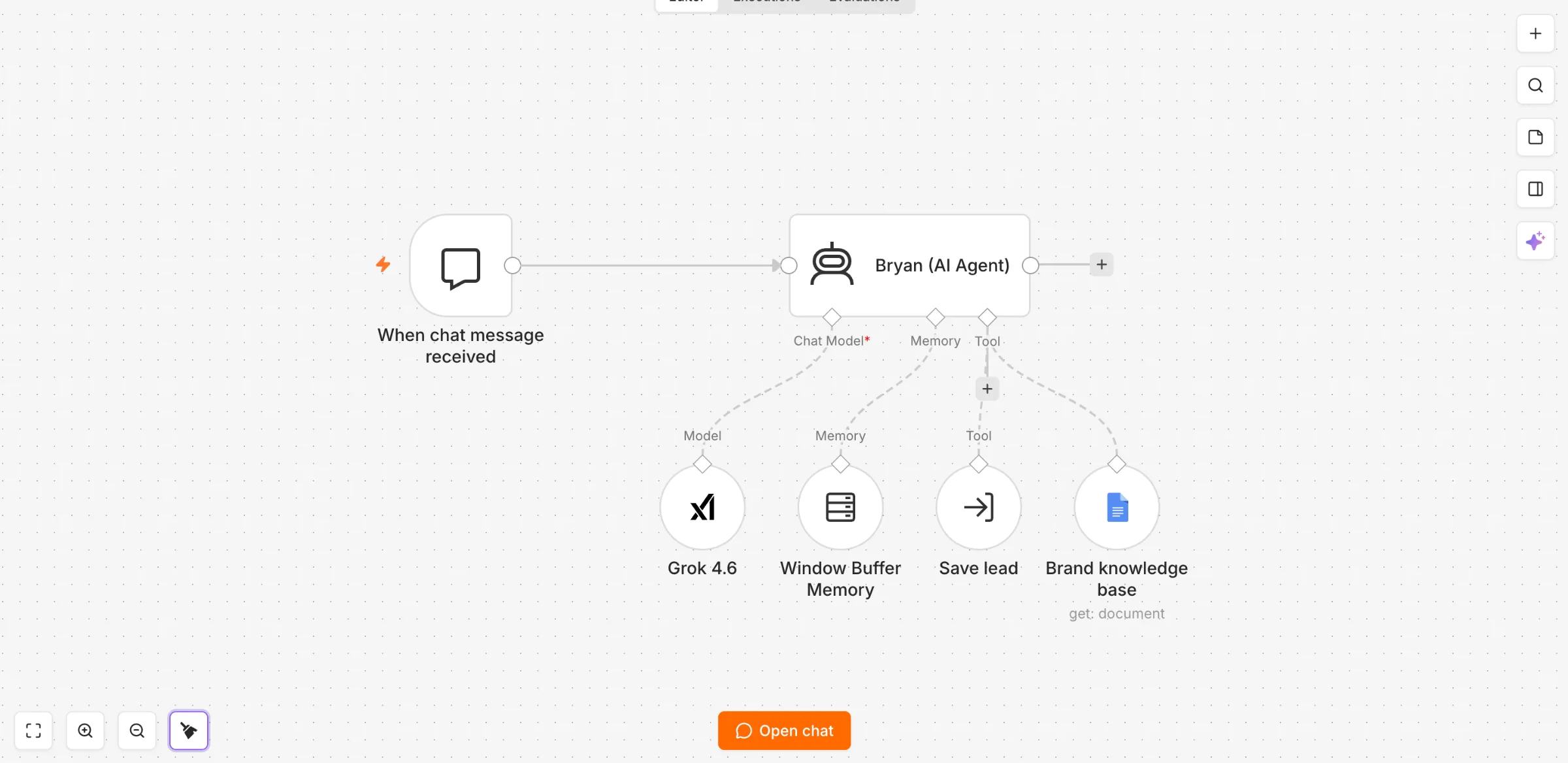
The AI lead agent is a 24/7 site chatbot that answers in your voice and hands confirmed, qualified leads to your CRM.
It sits on the pages prospects already visit and speaks from one knowledge file about the business. Sales only sees a record after the visitor confirms a recap, so the CRM gets a clean hand-off.
Best for: high-ticket sites in luxury travel, real estate, and premium services that already have traffic and want those visits turned into qualified inquiries.
How it works
The agent is an n8n chat workflow embedded on the site. A small, fast model runs the thread with a 20-message window, and every public sentence comes from your brand file.
- Speaks from one knowledge file (who you serve, offers, FAQs, hand-off rules) and pulls extra detail from that file at most once per visitor message.
- When someone shows intent, it collects fields 1 or 2 at a time, asks for a country code on the phone, and skips anything already given.
- It recaps every detail, waits for a clear yes, then passes confirmed leads to the lead formatter with channel
chatbotand sourceWebsite - Chatbot. - The same turn emails the owner a one-line summary and, if they opted in, runs the newsletter subscribe.
- The widget sends the page URL in metadata, so the agent knows which page the visitor is on.
- If asked, it says it is an AI assistant and that a person reads every inquiry.
Where it wins
Intent is still hot. The reply is immediate, in your voice, and the capture runs around the clock, so after-hours visits still become conversations.
AI agents on the site pull more qualified leads from traffic you already earn organically, with the same headcount. The thread is personalized from your own offers and FAQs, which is what a high-ticket buyer expects before they hand over a number.
Watch-outs
Give AI agents explicit action boundaries: what to ask per intent, when to save, when to pass the thread to a person. High-risk steps (discounts, custom quotes, delivery dates) stay with a human.
A common experience is that personalized outreach copy written by a model reads as generic bot phrasing, so keep the agent inside brand material and quote prices only as written in Offers. Capture your voice first, then run tool calls only after the recap yes, once each, in that same turn.
Who it’s for
This is for operators who already get site visits and want those prospects in the CRM the same day, with enough context that sales can call back with a real brief. It fits high-ticket work in luxury travel and real estate, where one inquiry is worth sitting in the thread. Outreach after the hand-off is a person on the phone, working a recap the visitor already confirmed.
2. Lead Formatter
Overview
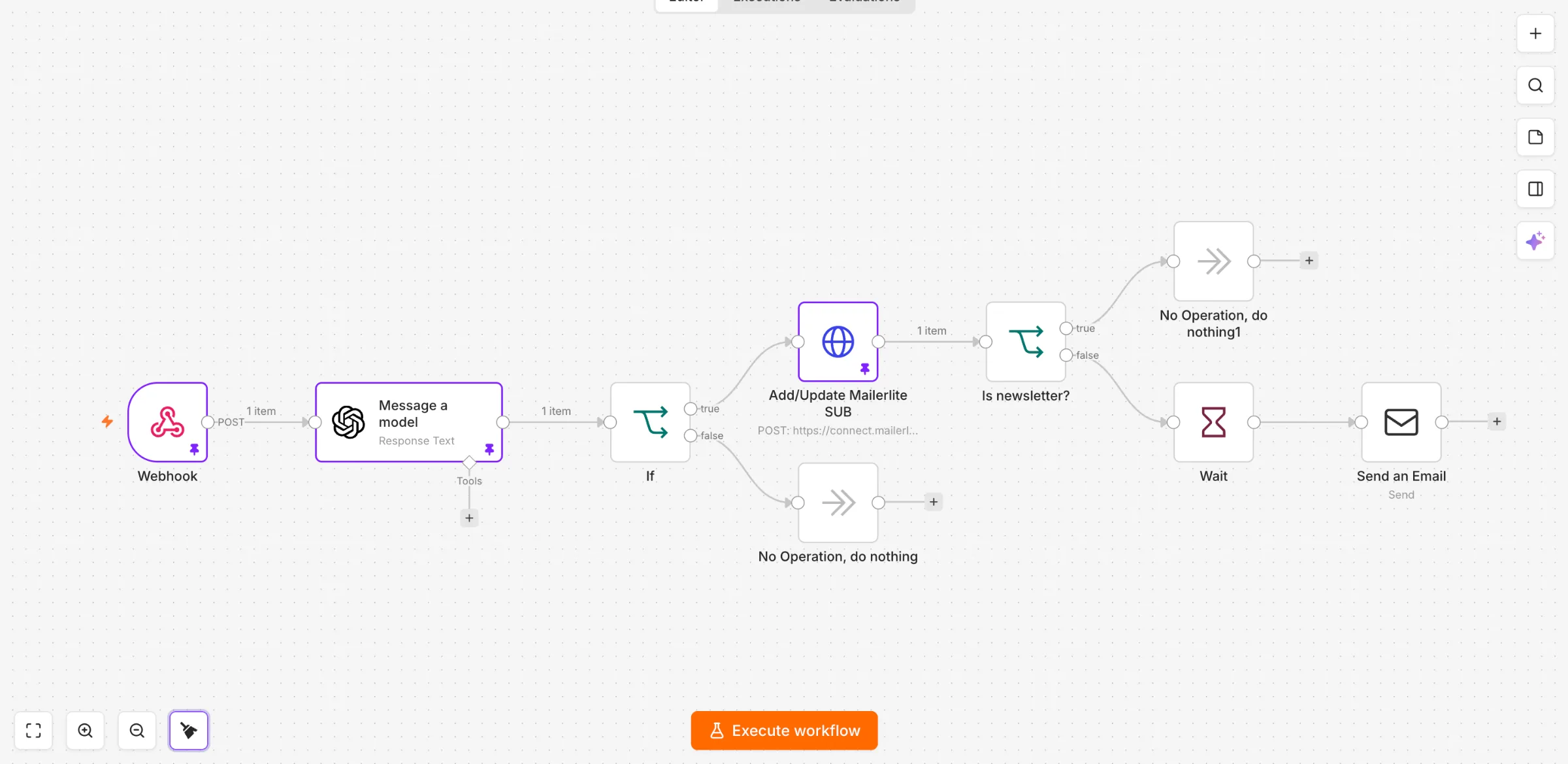
The lead formatter is an inbound n8n system designed for teams with several forms that parses every submission, cleans it into one CRM record, and sends a personal reply inside five minutes. Webhooks sit on every source, and the payload is cleaned before it hits the CRM.
Inbound leads become a clean JSON object plus a salesperson briefing note (source, intent, and geography). The row is written so sales can call with the facts in front of them.
Best for: inbound operators who want identical CRM records and a five-minute first touch on every real enquiry.
How it works
Two workflows handle the job. Form intake receives the webhook, and Lead upsert is the only writer into the CRM, so field rules stay in one place.
- AI parses every submission into JSON, with a spam flag, normalized fields, a salesperson note, and six lines for the reply.
- Promotional or automated pitches are logged and stopped. Partial enquiries still continue.
- Names, email, phone, and dates are cleaned in code. Phones keep the country code the person typed, and empty values drop so known data stays intact.
- Search by email, then insert or update. Returning leads stay on one row, including two submits ten seconds apart.
- A dated note is written for whoever calls back, with the form name, what they asked, and any intake warnings.
- After a 3-minute wait, the personal reply lands inside five minutes. With live set to false, it goes to the owner first.
Where it wins
Every record lands formatted the same way, so the person who calls back can see the source and the timing on the record. That’s the data quality win, and it’s what makes later outreach worth sending.
Hot prospects get a human-sounding first touch inside five minutes, tied to what they actually asked. And sales works from one row per person, with earlier enquiries kept under the new note.
Watch-outs
A common experience is that messaging automation pays off when the data workflow and a scoreable field rubric are dialed in. Set the CRM API names and empty-value rules before you turn the webhook on.
Personal outreach uses only submitted facts, in your voice, with a short confirmation question that invites a one-line answer. That is the rule that keeps automation useful once volume rises.
Who it’s for
This system suits businesses that already collect inbound leads through more than one form and have someone in sales who actually calls back. It’s built for operators who care about speed-to-lead on real prospects, with field rules that keep CRM data clean as volume grows.
3. Syndication Engine
Overview
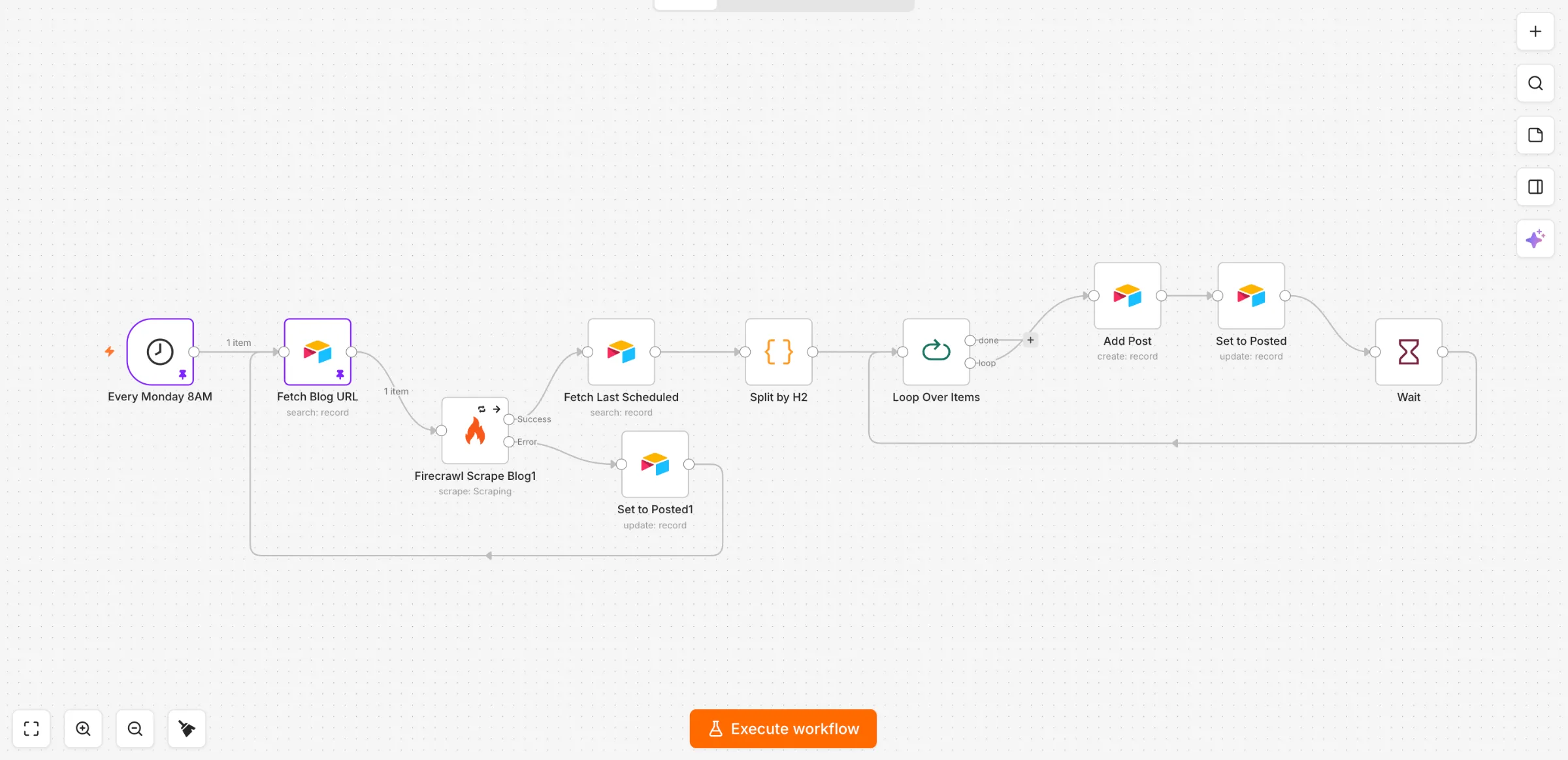
The syndication engine is an n8n content pipeline designed for teams whose marketing already lives on the blog, and it splits each published post into one social post per section and queues those posts for LinkedIn and Facebook.
In the zero-click era, ChatGPT and Perplexity can cite your page while the reader stays inside the answer. This automation takes the article you already shipped and turns it into dated outreach: one H2 section per day, formatted at posting time, public after you approve the row.
Best for: operators who want a week of social campaigns from editorial they already wrote, with a human gate before anything goes live.
How it works
Two n8n workflows share one Airtable calendar. Blog to calendar scrapes a published URL with Firecrawl and writes Draft rows so published marketing keeps moving, then Publisher formats those rows at posting time and handles the live switch.
- Split a published post on H2 headings, then queue one section per consecutive day.
- Skip introduction, overview, FAQ, and similar blocks, plus any section under 100 words.
- Attach a 16:9 image per section from the first real photo after that H2.
- At posting time, AI writes personalized copy per platform: LinkedIn tight with aggressive line breaks, Facebook a little longer and more narrative.
- The first line carries the post, under 180 characters, as a declarative claim with stakes.
- Post after the owner sets the row to Approved. While live is false, formatted copy is saved on the row and a preview email goes to the owner.
Where it wins
The win is omnipresence from work already done. One article becomes a run of posts on LinkedIn and Facebook, so the content meets people on the feed they already open.
The first line carries the post (under 180 characters, a declarative claim with stakes), with copy personalized per platform so the outreach stops the scroll. Because formatting happens at posting time, blog sections become a single set of campaigns you still review.
Watch-outs
Only Approved rows ever post. Monday review is your marketing control: you promote keepers and the rest stay Draft.
Keep the source’s sharp words, numbers, names, tools, and places so the copy stays in your voice. The model shortens the section and copies your claims.
Who it’s for
This system suits blog-led teams that already run LinkedIn and Facebook and want n8n automation to turn each article into a short run of outreach. If your marketing calendar is empty after you hit publish, it fills that calendar with campaigns you’ll still approve by hand.
4. Second Brain
Overview
The second brain is an n8n capture system designed for founders who think out loud. It files every Telegram capture as a timestamped markdown note, then turns that week’s own thinking into draft posts.
The brand context folder sits on the same build, so Monday drafts keep the founder’s phrasing and the voice rules we already use everywhere else. That’s how a capture habit stays on-brand when automation writes the calendar rows.
Best for: founders whose marketing starts as a voice note and should land in the content calendar with their own wording intact.
How it works
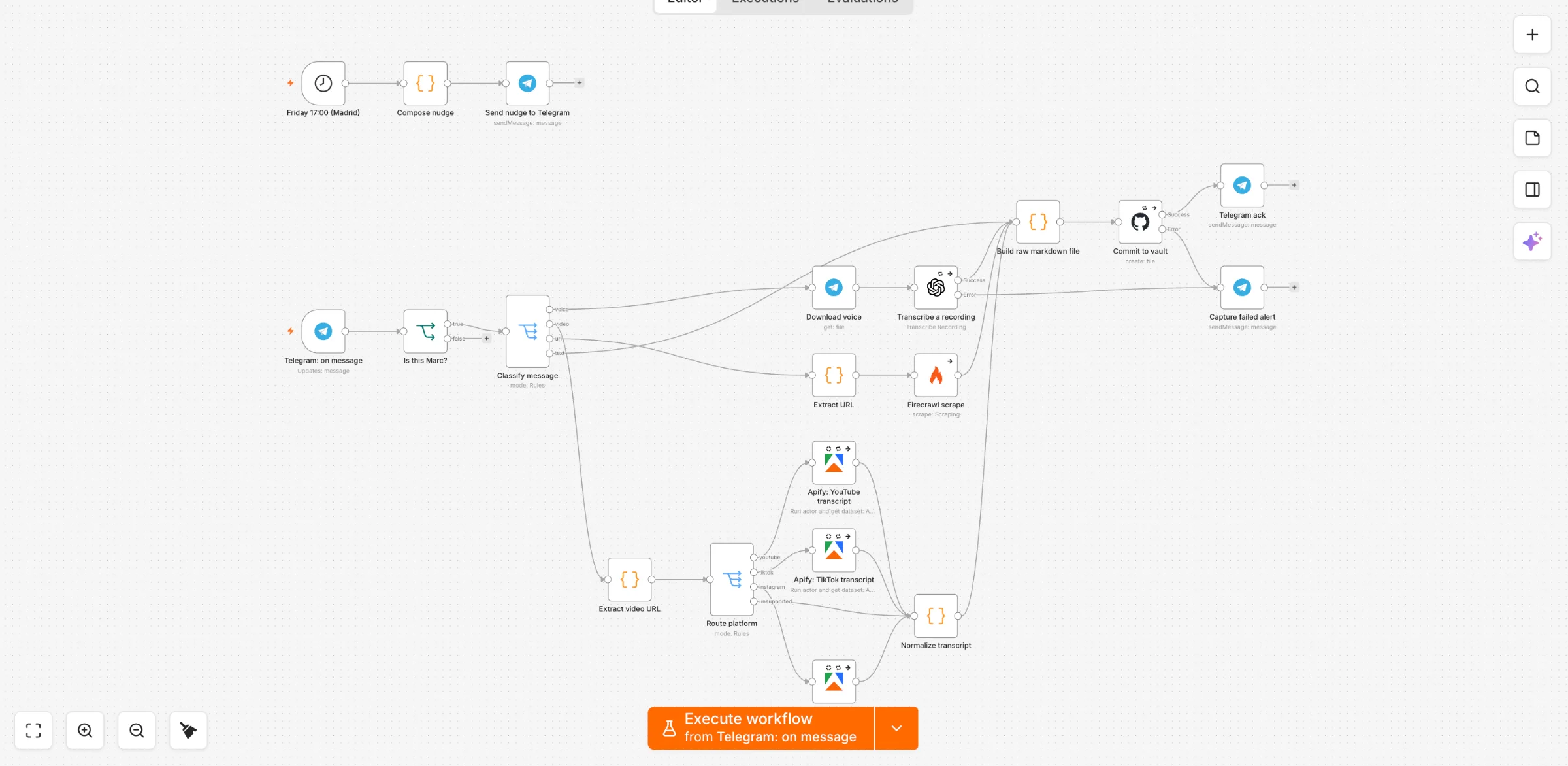
Send a voice note, a link, a video URL or a text to a private Telegram bot, and each one becomes a timestamped markdown note in a GitHub repo (and in Obsidian). Every Monday the week’s own-thinking notes become draft posts in the syndication calendar.
- Messages from the owner’s Telegram ID are filed. Voice and video notes are transcribed, other links are scraped with Firecrawl, and YouTube, TikTok or Instagram URLs get a transcript when Apify is connected.
- Capture writes
raw/YYYY-MM-DD-HHMMSS.mdinto a private GitHub repo, with frontmatter for source type, origin and word count. Obsidian Git can pull that same repo on a short interval. - Every Monday at 07:00 (ahead of the blog-syndication run) a second workflow reads the last seven days of notes and writes Draft rows into the social calendar, Source type Note.
- Spoken and typed notes become the post-ready passages, each one traced to a single file. The syndication publisher then formats those rows at posting time.
- A Friday 17:00 Telegram message asks what you learned this week, so the habit has a weekly prompt.
Where it wins
Your ideas stay on file and that data feeds the content that drives leads. The founder’s own sentences, claims and examples become the week’s marketing drafts, so the business sounds like the person who actually runs it.
The Monday pass traces each draft to one note, so you can see which thought became which post. The week’s insights stay attached to a file you can open later. And those drafts share the syndication calendar, so notes and blog sections go through the same approval path.
Watch-outs
Spoken and typed notes become the post voice. Web-link and video-transcript files stay as context, so scraped pages inform the draft and the founder’s wording stays in the foreground.
For production systems, wire the data path first (store the note, then route it into the calendar). Message polish comes after that workflow exists. A photo with no caption files as a thin text note, and broken commits or transcripts send a plain-text Telegram alert.
Who it’s for
This system suits a founder-led business where the person closing sales already talks ideas into their phone. It fits operators who will run a private Telegram bot and a GitHub repo, and who want weekly marketing drafts from their own words.
5. Monthly SEO Report
Overview
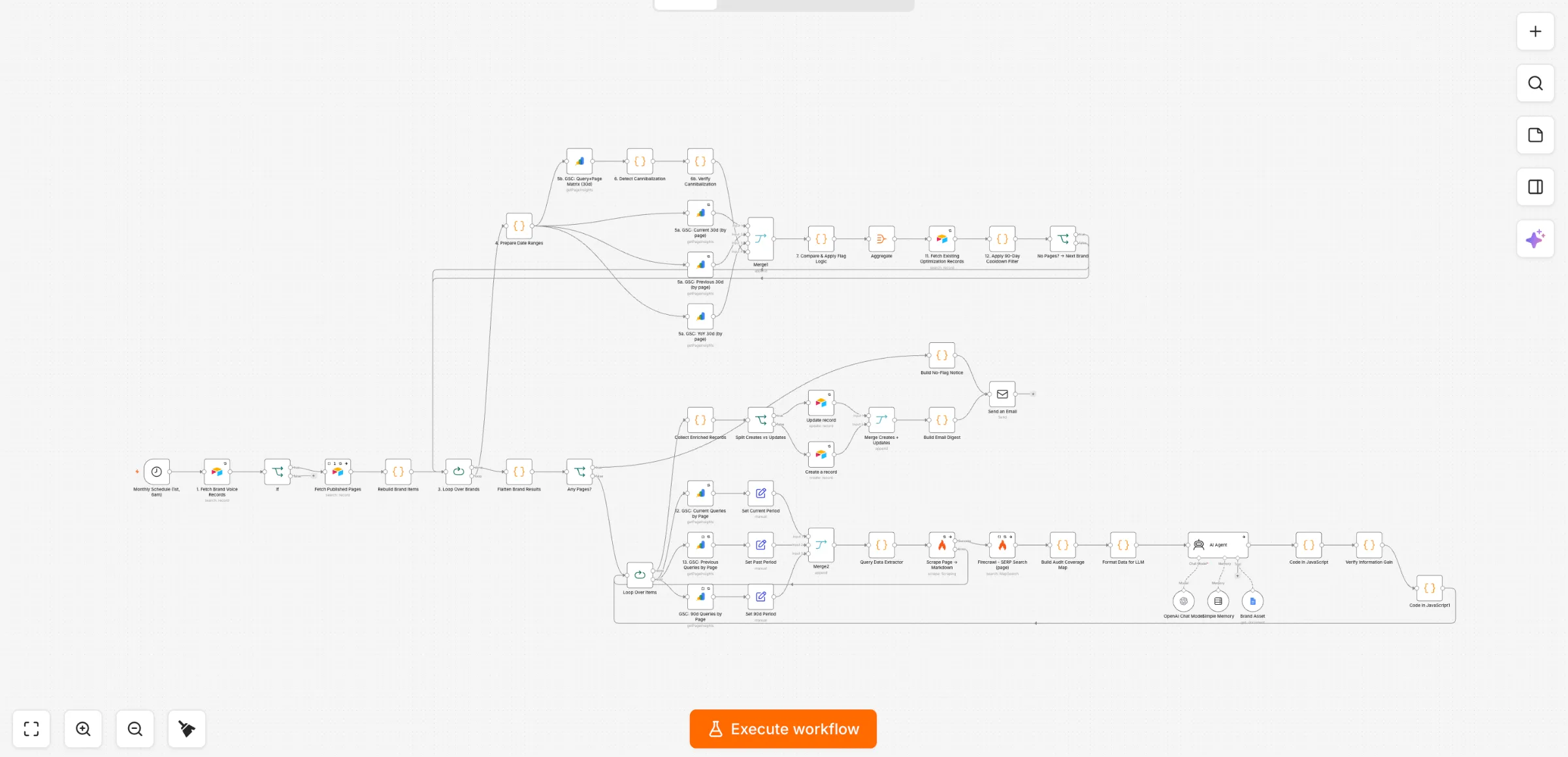
The monthly SEO report is a scheduled n8n workflow designed for teams already investing in organic marketing that turns Search Console and GA4 data into wins, flagged pages, and three actions in a branded email. It runs on the 1st of the month, in your time zone, and it protects the traffic the rest of this stack turns into inquiries.
Code computes every figure first. The model only words those findings, so the narrative stays honest about growth and where to double down.
Best for: founders and client-facing operators who want a monthly organic score in the inbox, tied to pages they can fix.
How it works
On the 1st of the month at 06:00 (and on a manual trigger for tests), the workflow loops every site with Report enabled and builds the month’s picture through a fixed process. Fragment and query variants are merged first, so each flag attaches to one page.
- Pull Search Console data for current, previous, and year-on-year pages, plus the query-plus-page matrix.
- Pull GA4 organic landing pages for sessions, engaged sessions, and key events.
- Compute wins and page flags in code: traffic decline, position drop, low CTR, near page 1, dropped out, and cannibalization, plus rising pages and site-wide totals. Minimums scale by site size.
- Apply a cooldown for pages a person already moved, plus anything optimized in the last 90 days, and keep up to 30 flagged pages.
- Hand only those computed figures to the model, which words what’s working, what needs attention, and three recommended actions.
- Log the flags and email a branded HTML report. With live set to false, every report lands in the owner’s inbox.
Where it wins
This is the system that guards the top of the funnel. Syndication, the second brain, and the agent all need pages that still rank, and this report catches a decline while there is still time to fix the page. That keeps marketing and sales fed with qualified inquiries.
Every number is computed in code, which is the same discipline we use when we audit a live workflow. On a 36-node production SEO audit workflow, that inspection found four real bugs, including duplicate records and miscalibrated thresholds. The next run flagged exactly one page.
So the insights land in the inbox, and organic growth has a monthly score the sales team can act on.
Watch-outs
Decayed data still tanks results even when the rest of the stack is dialed in. Contact lists go stale the same way pages do: mailing people who have already been worked, or who no longer exist, can tank performance even when copy and infrastructure look solid. This report exists to catch page-level decline before it costs pipeline.
Search Console lags two to three days, so every window ends today minus 3. Code computes every figure, and the model only words the insights from that payload.
Test the first run against live data for one site, then approve the layout before a client receives a report.
Who it’s for
This system suits in-house marketing leads and agencies who already have Search Console and GA4 connected, and who need a monthly picture of what’s working before they brief the next round of content. It also suits a founder who wants three actions delivered to the inbox.
The Five Systems Compared
These five systems sit on the same n8n stack, and this table is the scan that matches each one to a job. Columns stay fixed: who it is best for, what it does in one line, the human vs AI split, and the main watch-out.
| System | Best for | What it does in one line | Human vs AI split | Main watch-out |
|---|---|---|---|---|
| AI Lead Agent | Instant inbound capture | 24/7 chatbot that qualifies and hands off confirmed leads | AI qualifies, human handles high-risk steps | Needs explicit action boundaries |
| Lead Formatter | Clean CRM and speed-to-lead | Parses, cleans, de-dupes and replies in five minutes | AI parses and drafts, human calls back | Set field rules before automating |
| Syndication Engine | Omnipresence from existing posts | One social post per blog section, posted on approval | AI formats per platform, human approves | Only approved rows post |
| Second Brain | Capturing your own thinking | Telegram notes become GitHub markdown and weekly drafts | AI drafts from your words, human edits | Only your own words become voice |
| Monthly SEO Report | Protecting organic traffic | GSC and GA4 into wins, flags and three actions | Code computes, AI words, human acts | Numbers only from code |
How to Choose the Right System for Your Business
Start at the leak in the pipeline, then choose how the work gets run. The converting stack is the one that closes the gap you already feel, on a live switch you flip yourself.
Start where your pipeline actually leaks
Map the symptom to the n8n system before you buy more tools. The leak you feel this week is the only lead generation buying criterion that matters.
- Slow replies after a form: lead formatter, with a personal answer inside five minutes
- Thin reach from published posts: syndication engine
- Ideas stuck in voice notes: second brain
- Decaying search traffic: monthly SEO report
- Quiet inbound on the site: AI lead agent
Managed build or owned buyout
We run the same organic stack two ways, and both fit a business that already wants compounding inbound. Managed is the hands-off retainer: we build and operate the tools while you take the output, and we keep optimizing as brand data comes in. Owned is a buyout you run after we install the engine (full stack or one sub-engine), and both paths start with a scoping call, so get in touch and we’ll match the leak to the build.
Governance before scale
Stand up the live switch and the review gate before outreach volume climbs. A common experience is that one ungoverned AI burst can poison a domain you were still warming, so you review real samples before those tools can send. Treat deliverability as its own bottleneck (separate sending domains, SPF, DKIM, DMARC, and a real warmup) and only then let campaigns run.
What you control versus what the system controls
Keep the offer inspectable: the lead generation tools own delivery, targeting, and qualification, and the business owns fast follow-up plus the sales conversation. Kill action friction with done-for-you capture, thinking friction with a repeatable process, and emotional friction with a human on the high-risk step. So stack those three and ai lead generation starts converting, because outreach is governed and the follow-up is yours.
Frequently Asked Questions
Can I really use AI for lead generation on my own site?
Yes, you can run lead generation from your own site with a chatbot or form webhook that parses the enquiry and writes one CRM record, then sends a personal reply in your voice. The same tools can sit on a hidden test page first, then on the live domains once you have read the transcripts.
A small, fast model answers from a knowledge file about the business. Confirmed details share the same cleaning rules as every other form, so follow-up starts from one record.
Do I need a big contact database to make these systems work?
A smaller, well-targeted list of prospects is enough. These tools work from the forms and CRM fields you already run, plus a simple table if you queue content from the blog.
Clean emails and a duplicate check on email matter more than file size. Enrichment fills what the visitor left blank, and routing sends the record to whoever calls back.
Why does my outbound feel like it stops working some weeks?
A common experience is a binge-pause cycle. You send a burst of outreach while the calendar is open, then busy weeks leave those leads untouched, and the later empty pipeline feels like the channel died.
The stall sits in the follow-up gap. An inspectable run, from CRM notes and execution history, shows where the pause started.
How do I keep a fixed amount of prospecting going when I’m busy?
Set a small, fixed prospecting floor that still runs in the busiest week. Some operators keep the human work on the emails and let automation handle the rest of the queue.
The floor is a time box you protect. The tools around it can parse and route so the writing still happens.
Should I start with the AI writing or the data workflow first?
Wire the database, enrichment, and routing before you optimize the message. Field names and duplicate checks decide whether a lead is usable.
The tools that personalize a line only help once the record is clean. So start with the data workflow, then train the writing on real samples from your own lead generation.
Are AI lead generation systems safe to run without supervision?
Keep a review gate and a live switch on every workflow that emails a lead or posts in public. While the switch is off, output goes to your inbox or stays in the calendar until you have read real samples.
That is how AI lead generation stays inspectable. You flip live yourself after the samples look right, and the business pauses a run by deactivating the workflow or turning the live switch off.